The Quickest Way
Type a business type and a city into a Google Maps scraper, run the search, and download the results as CSV. The first 25 businesses take under a minute, with no code, no browser extension and no proxies.
| Web tool | API | Your own scraper | |
|---|---|---|---|
| Setup | None | An API key and a few lines of code | Install, configure, run servers |
| Cost | Free for 50 a month, then a plan | Per result, or a plan | Your time, servers and proxies |
| Best for | One-off lists, sales prospecting | Apps and recurring jobs | Developers who want full control |
| Upkeep when Google changes | Handled for you | Handled for you | Yours |
Method 1: Scrape Google Maps Without Code
Step 1: Enter a business type and a location
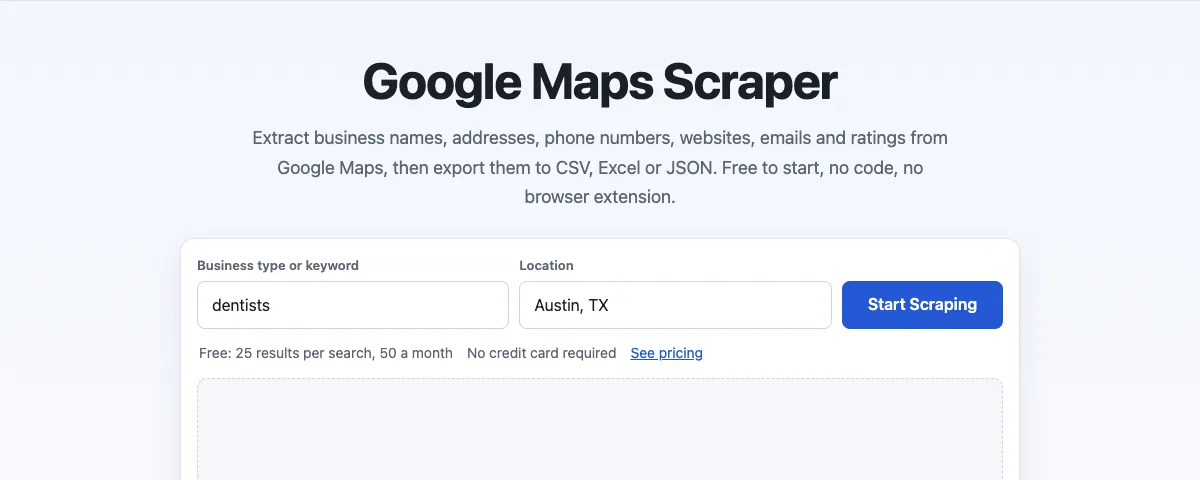
Open the Google Maps scraper. In the first box, type what you're looking for, the way you would on Google Maps: "dentists", "coffee shops", "roofing contractors". In the second, type a city, region, postcode or country. Then click Start Scraping.
Step 2: Review the results table
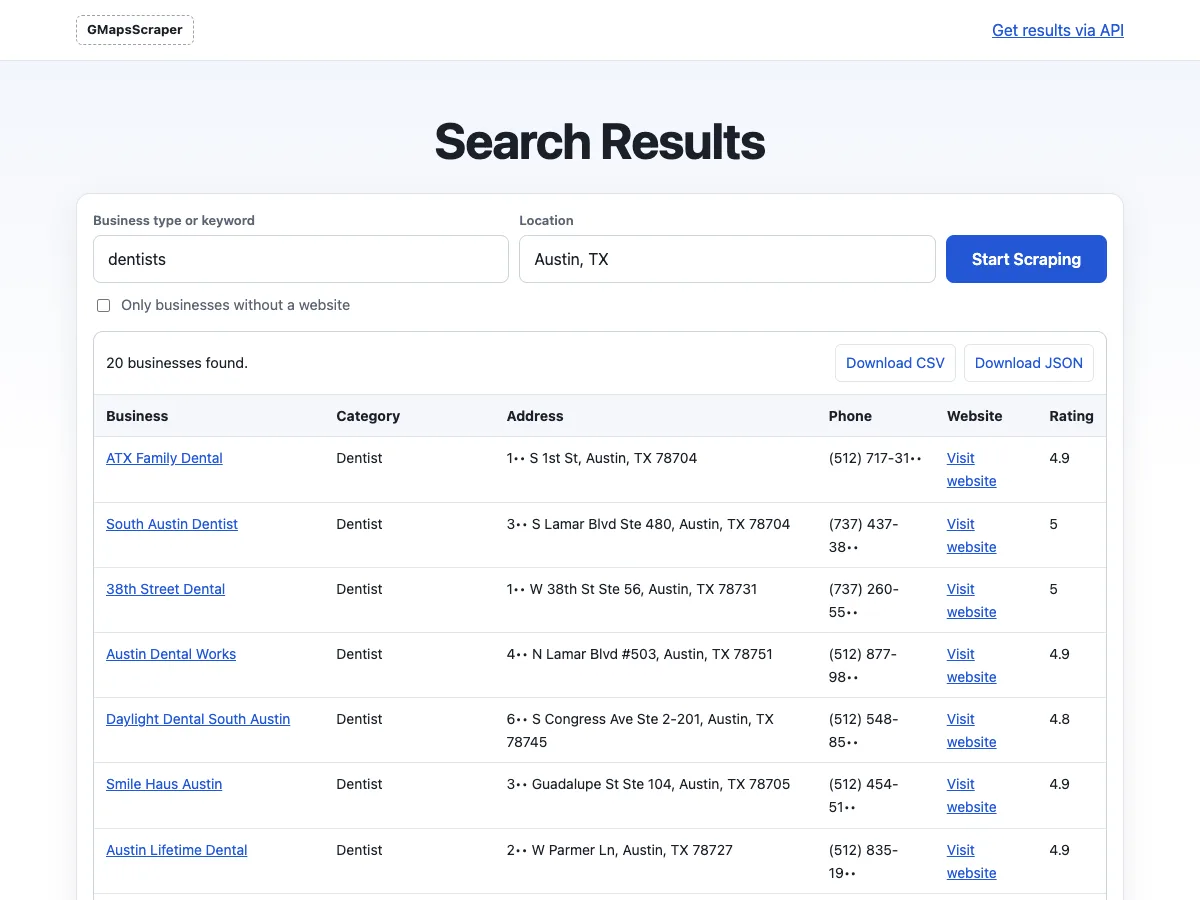
The scraper runs the same search on Google Maps, opens each listing and fills in a table: business name, category, address, phone, website and rating. A search of 25 businesses usually takes 20 to 40 seconds.
Step 3: Open a business for every field
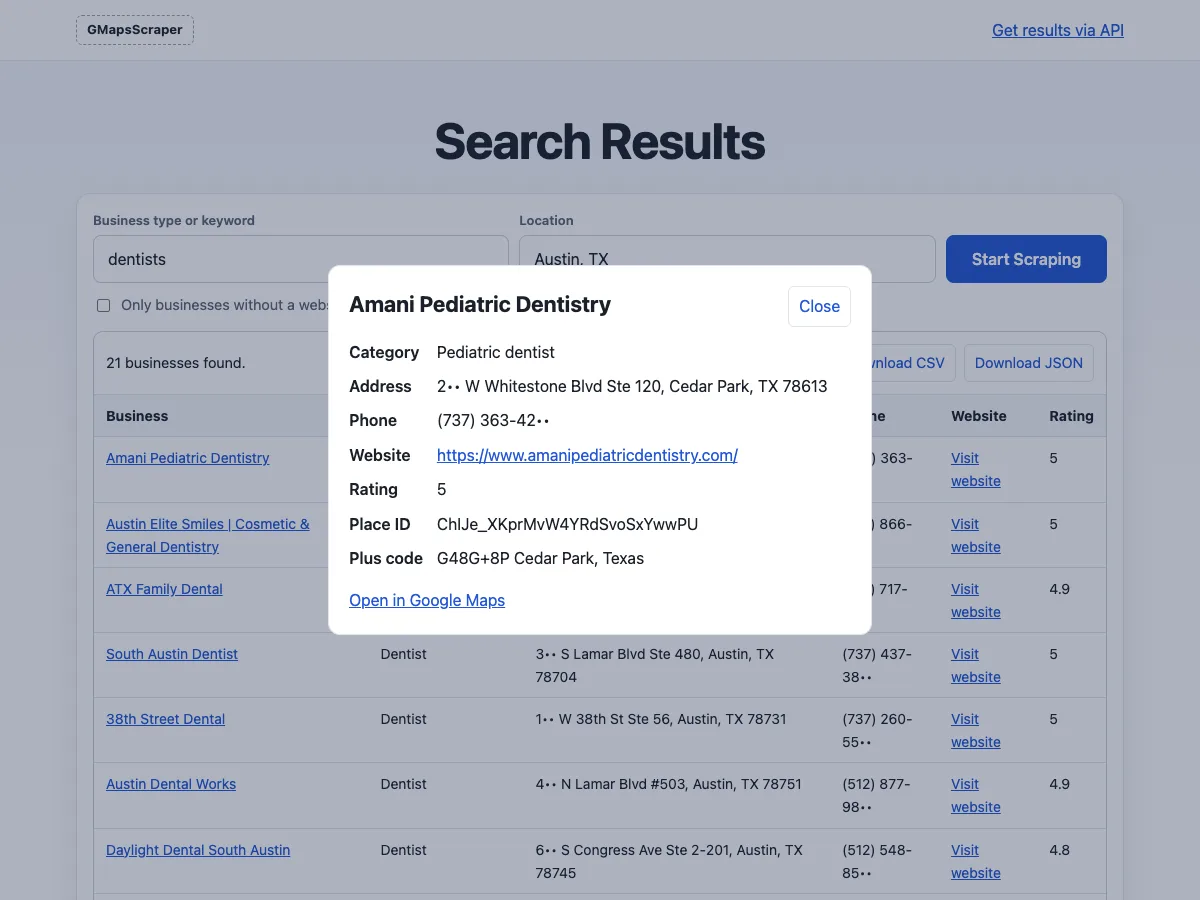
Click a business name to see everything collected for it, including its Place ID, plus code and a link back to Google Maps.
Step 4: Download CSV, Excel or JSON
Click Download CSV for a file that opens cleanly in Excel or Google Sheets and imports into a CRM; it's UTF-8 with a byte-order mark, so accented names survive. JSON keeps every field for developers, and paid plans add a native Excel download. The free plan covers 25 results per search and 50 a month; paid plans go up to 500 per search.
How to Cover a Large City
A single Google Maps search only shows a limited number of places, usually not more than about 120, however big the city. To build a complete list:
- Split the area. Search neighborhood by neighborhood or postcode by postcode: "dentists in 78704", "dentists in 78745", and so on.
- Split the category. "Pediatric dentist", "orthodontist" and "dental clinic" each surface places a plain "dentists" search misses.
- Merge and remove duplicates. Overlapping searches return some of the same places. Drop all the CSV files into the CSV merger, which joins them and removes duplicates by Place ID, in your browser.
For a whole state or country, it's faster to ask for a bulk dataset.
Method 2: Scrape Google Maps With an API
If the list feeds an app, a CRM or a scheduled job, call the Google Maps scraper API instead. One request runs one search and returns JSON with the same fields as the web tool. Get a free key on the API page; it covers 50 results a month.
curl -G https://gmapsscraper.app/api/v1/search \
  -H "X-API-Key: YOUR_API_KEY" \
  --data-urlencode "query=dentists in Austin, TX" \
  -d limit=100
The same search in Python:
import requests

response = requests.get(
    "https://gmapsscraper.app/api/v1/search",
    headers={"X-API-Key": "YOUR_API_KEY"},
    params={"query": "dentists in Austin, TX", "limit": 100},
    timeout=200,
)
response.raise_for_status()
for place in response.json()["results"]:
    print(place["name"], place["phone"], place["website"])
Add without_website=true to get only businesses without a website, a common list for web designers. The official Google Places API is the other route for developers; it limits searches to 60 places and doesn't let you store the results, as explained in Google Maps API pricing.
Method 3: Run Your Own Open-Source Scraper
If you'd rather run everything yourself, open-source projects do the scraping in a headless browser. The best known is gosom/google-maps-scraper, written in Go under the MIT license, which runs from the command line or Docker and writes CSV or JSON. Our own service builds on it.
Downloading it is free; running it at scale isn't:
- Browsers and servers. Each listing is a page load in a real browser. Hundreds of places a day need a server or a hosted browser service.
- Blocking. Many requests from one address get slowed down or blocked, so larger jobs need proxies and pacing.
- Upkeep. Google changes its pages without notice. When it does, fields go missing until someone updates the parser.
- Reduced pages. Google Maps often shows visitors who aren't signed in a reduced page, for example a rating without its review count, or only today's opening hours. A scraper can only collect what the page shows.
What Data You Can Get From Google Maps
Each listing gives you the business name, category, full address split into city, postcode and state, phone number, website, rating, review count when Google shows it, coordinates, Place ID, plus code, price level and business status. The Google Maps data scraper page lists every field with an example.
Two things aren't on the listing. Email addresses live on the business's own website, so paid plans add the emails each website publishes, and the email extractor pulls them from a list of sites. Contact names and job titles aren't on Google Maps at all.
Is It Legal to Scrape Google Maps?
Business listings are public, and collecting them is common practice. Two things still apply: Google's terms of service limit automated access to its services, and any data about people, such as reviewer names, falls under privacy laws like GDPR. How you use the list matters too: cold email and calls are covered by laws such as CAN-SPAM, GDPR and the TCPA. This isn't legal advice; for anything beyond business contact details, ask a lawyer where you operate.
FAQ
Can I scrape Google Maps for free?
Yes. The web tool gives you 25 results per search and 50 a month with no account or card, and open-source scrapers cost nothing to download if you run them yourself.
How many results can I get from one search?
Up to 25 on the free plan and up to 500 on paid plans, but Google Maps itself only shows a limited number of places per search. Split big areas into smaller ones for complete coverage.
Can I get email addresses from Google Maps?
Not from the listing itself; Google Maps doesn't show emails. They come from each business's website, which paid plans visit for you, or which you can scan with the email extractor.
How do I export Google Maps results to Excel?
Download the CSV and open it in Excel; the file is encoded so names and addresses display correctly. Paid plans can download an .xlsx file directly.
How do I avoid getting blocked when scraping Google Maps?
If you run your own scraper, slow down, spread requests over time and use rotating proxies. With a hosted scraper or API, that's handled for you.